Ever Wonder What a Virtual Mailbox Actually Looks Like Behind the Scenes?
Ever Wonder What a Virtual Mailbox Actually Looks Like Behind the Scenes?
Introduction
Imagine checking your mail while sitting in a coffee shop, working from your home office, or traveling hundreds of miles away.
You open your phone, review a mail notification, and decide what needs your attention—all without driving to a mailbox.
Sounds convenient, right?
That's the idea behind a virtual mailbox.
But have you ever wondered what happens behind the scenes? Who receives your mail? How does a physical envelope become something you can review online? And what happens when a package arrives instead of a letter?
A virtual mailbox isn't magic. It combines physical mail handling with digital tools that help you manage correspondence remotely.
Your mail still has a physical journey. A virtual mailbox simply gives you a more flexible way to manage it.
Let's take a closer look at how the process works, who can benefit from it, and what you should know before choosing a service.
1. First, What Is a Virtual Mailbox?
A virtual mailbox is a service that allows you to manage certain aspects of your physical mail online.
Depending on the provider and plan, you may receive notifications when mail arrives, view images of envelopes, request mail forwarding, or access additional mail-handling options.
Instead of needing to visit a physical location every time you want to check your mail, you can use an online account or app to review available information and request eligible services.
Virtual mailboxes can be useful for:
Remote workers
Freelancers and consultants
Home-based business owners
Entrepreneurs
Frequent travelers
Digital nomads
Small businesses without traditional office space
The available features vary, so it's important to understand what a specific provider actually offers.
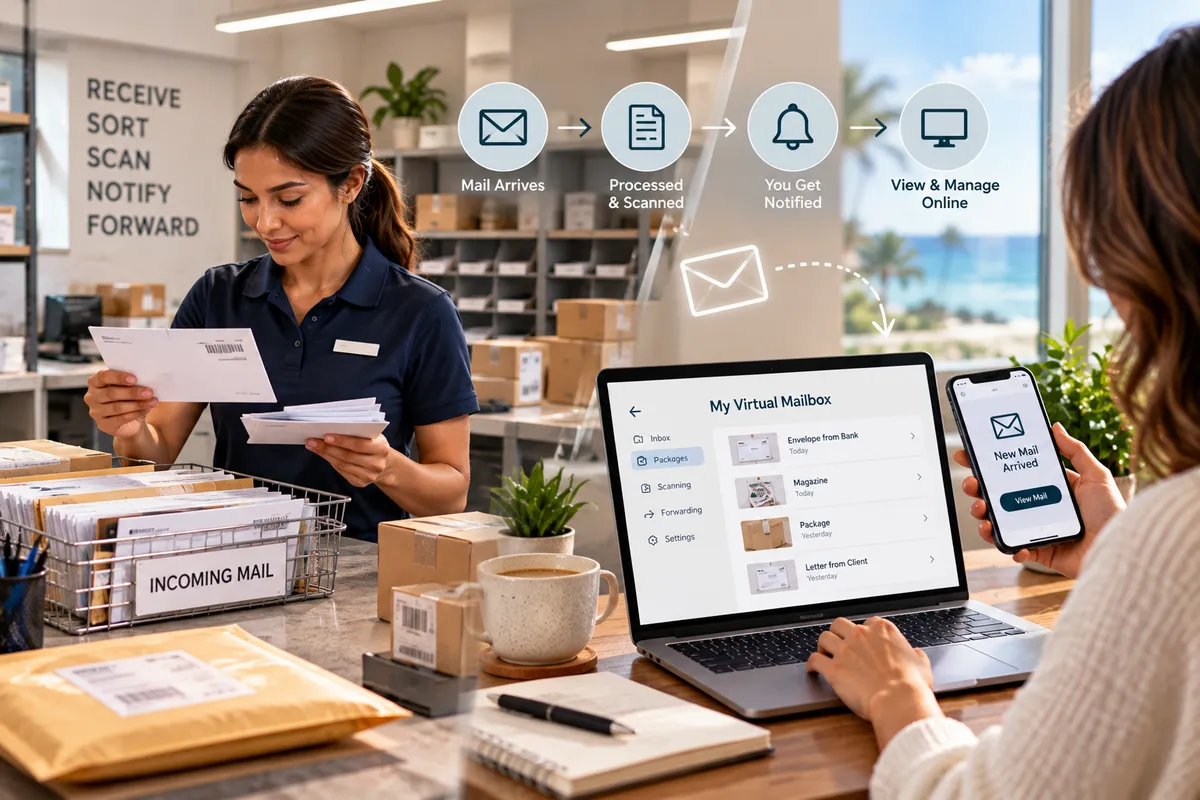
2. Behind the Scenes: What Happens When Your Mail Arrives?
The process usually begins with a physical delivery.
Here's a simplified look at how a virtual mailbox may work.
Step 1: Your mail arrives
A letter or eligible package is delivered to the service's physical mailing location.
Step 2: The delivery is processed
Staff follow the provider's procedures to identify and record the incoming item and associate it with the appropriate customer account.
Step 3: Mail information becomes available online
Depending on the service, an image of the envelope or a notification may be added to your account. Access to the contents may require a separate scanning request.
Step 4: You review your mail remotely
You sign in to your account, review the available information, and decide what to do next.
Step 5: You choose an available action
Depending on the provider, you may request scanning, forwarding, pickup, or another eligible mail-handling service.
Not every virtual mailbox follows exactly the same workflow. Some providers offer only selected features, and certain items may require additional authorization or handling.
3. What Does a Virtual Mailbox Actually Look Like?
Here's where the concept becomes easier to understand.
A virtual mailbox typically involves two connected environments: a physical mail-handling location and a digital interface.
The physical side

The physical location is where incoming correspondence is received and handled. Depending on the provider, it may include mailboxes, sorting areas, secure storage, package shelves, and equipment used to process incoming items.
Your mail doesn't disappear into the internet. It remains physical unless a service scans or otherwise digitizes the relevant information.
The digital side

The online interface is where you may receive notifications, review envelope images, submit requests, and manage eligible mail services.
The dashboard's appearance and available controls depend on the provider's software.
Together, these two sides allow you to manage physical correspondence without necessarily visiting the mailing location each time.
4. Does a Virtual Mailbox Mean Every Letter Is Scanned?
Not necessarily.
This is one of the most common misconceptions about virtual mailboxes.
Many services distinguish between an envelope scan and a document scan.
An envelope scan may show the outside of an envelope, helping you identify the sender or decide whether the item needs attention.
A document scan typically involves opening an eligible item and digitizing some or all of its contents, subject to the provider's procedures and your authorization.
Depending on the plan, document scanning may involve additional fees or limits.
Before choosing a service, ask:
Are envelope images included?
Can I request the contents of a letter to be scanned?
Are there page limits or additional charges?
How are sensitive documents handled?
Can I request that mail remain unopened?
A virtual mailbox doesn't automatically mean unlimited access to digital copies of everything you receive.
5. What Happens When a Package Arrives?
A virtual mailbox may also support package management, but package handling varies significantly between providers.
Some services accept eligible packages and notify you when they arrive. Others may offer forwarding, pickup, or additional handling options.
If you receive business supplies, online orders, or customer returns, package receiving may be an important feature to consider.
Before signing up, confirm:
Which carriers are accepted
Whether package receiving is included
Size and weight restrictions
How long packages can be stored
Whether forwarding is available
What shipping and handling fees apply
What happens to unclaimed packages
If your business regularly receives large shipments, make sure the provider's capacity matches your needs.
6. Who Benefits Most From a Virtual Mailbox?
Virtual mailbox services aren't limited to large companies.
They can be useful for people who need to manage mail while working or living in different places.
Remote Professionals
If you work from home or move between workspaces, a virtual mailbox may help you manage eligible correspondence without relying entirely on your residential mailbox.
Small Business Owners
Entrepreneurs may use mail-management services to organize business correspondence and reduce interruptions during the workday.
Frequent Travelers
If you spend weeks away from home, online mail notifications may help you stay informed about incoming items.
Freelancers and Consultants
Independent professionals may benefit from having a dedicated mailing arrangement separate from their personal routine.
Digital Nomads
People who work while traveling may find remote mail-management features useful, provided the service supports their location and delivery needs.
The best fit depends on your mail volume, travel schedule, privacy concerns, and budget.
7. Can a Virtual Mailbox Protect Your Home Address?
A virtual mailbox may provide an alternative mailing arrangement that helps separate eligible business correspondence from your home address.
This can be useful for entrepreneurs who prefer not to display their residential mailing address on certain materials when another address is permitted.
However, an important distinction applies.
A mailing address is not automatically a legal business address, registered office, or physical operating location for every purpose.
Banks, government agencies, licensing boards, payment platforms, and other organizations may have specific address requirements.
Before using a virtual mailbox address, confirm that the organization you're dealing with accepts that type of address for the intended purpose.
Also review the provider's privacy and security practices rather than assuming that any online mailbox service offers the same protections.
8. Is a Virtual Mailbox Secure?
Security depends on how the service handles physical mail, digital records, account access, and customer information.
A virtual mailbox may involve sensitive information, including sender details, addresses, financial correspondence, and personal documents.
Before choosing a provider, look for clear policies covering:
Physical mail access and storage
Customer identification and authorization
Account security
Document scanning and handling
Privacy and data retention
Package pickup and forwarding
Reporting problems or suspicious activity
You should also protect your own account with a strong, unique password and multifactor authentication when available.
No service can eliminate every risk. The goal is to choose a provider with procedures appropriate to the information and items it handles.
9. What Does a Virtual Mailbox Cost?
Pricing depends on the provider, location, and plan.
Some services charge a monthly subscription. Others may charge separately for document scanning, mail forwarding, package handling, storage, or additional recipients.
A low monthly price may not include every feature you need.
Before comparing plans, estimate how much mail you receive and which services you expect to use.
For example:
Your needs | Features to investigate |
|---|---|
Occasional correspondence | Basic mail notifications and envelope images |
Important letters while traveling | Document scanning and forwarding options |
Frequent business deliveries | Package acceptance and storage capacity |
Remote mail management | Online account access and notifications |
Business privacy | Address eligibility and privacy practices |
Compare the total expected cost rather than looking only at the advertised subscription price.
10. Virtual Mailbox vs. Private Mailbox: What's the Difference?
These services can overlap, but they emphasize different ways of managing correspondence.
Feature | Virtual mailbox | Private mailbox |
|---|---|---|
Main benefit | Remote management of eligible mail | Dedicated physical mailing location |
Online notifications | Often available | Depends on the provider |
Envelope images | May be included | Depends on the provider |
In-person collection | Depends on the provider | Often available under provider policies |
Document scanning | May be offered | May be available as an additional service |
Package receiving | Depends on the plan | Depends on the provider and plan |
Some businesses offer both private and virtual mailbox options.
If you prefer collecting mail in person but also want online management, ask whether a provider can accommodate both needs.
11. Questions to Ask Before Signing Up
A virtual mailbox can make mail management more convenient, but the service should fit your actual needs.
Before choosing a provider, ask:
What is included in the monthly fee?
Are envelope scans and document scans different services?
Can I receive packages from multiple carriers?
Are forwarding and scanning charged separately?
How long are packages stored?
Can I collect mail in person?
How is sensitive correspondence protected?
Does the address meet my business or agency requirements?
What happens if I cancel the service?
Are there additional fees or restrictions I should know about?
Clear answers can help you avoid unexpected costs and choose a service that works for your routine.
How Ship It - Bay & Beyond Can Help
At Ship It - Bay & Beyond, we help individuals, remote professionals, and small businesses manage practical mailing and document needs.
Our services include:
Virtual mailbox services for customers seeking remote mail-management options
Private mailboxes for eligible personal and business correspondence
Package receiving for eligible deliveries
Professional packing and shipping
Printing and copying
Document scanning
Secure document shredding for appropriate confidential paper records
Notary services
Fingerprinting
Passport photos
Business formation support
U-Haul and moving supplies
Additional office services
If you're exploring virtual mailbox options, ask us about the features available, how incoming mail is handled, and whether the service fits your needs. Features, fees, package limits, and remote-access options may vary.
Ship It - Bay & Beyond
5420 Central Ave, St. Petersburg, FL 33707
Phone: 727-344-9052
Whether you're managing a home-based business, working remotely, or frequently traveling, having a suitable mailing arrangement can help you keep physical correspondence organized.
Proudly Serving the Tampa Bay Area
Ship It - Bay & Beyond proudly serves:
St. Petersburg
Tampa
Clearwater
Largo
Pinellas Park
Seminole
Gulfport
Kenneth City
Treasure Island
St. Pete Beach
Madeira Beach
Indian Rocks Beach
Indian Shores
Redington Beach
North Redington Beach
Redington Shores
Safety Harbor
Oldsmar
Dunedin
Palm Harbor
Tarpon Springs
Belleair
Belleair Bluffs
Lealman
Pinellas County
Hillsborough County
Surrounding communities
Whether you need professional packing and shipping, printing, a private or virtual mailbox, notary, fingerprinting, secure shredding, document scanning, copying, passport photos, business formation support, U-Haul, moving supplies, or other office services, Ship It - Bay & Beyond is your local resource for everyday business and mailing needs.
The Bottom Line
A virtual mailbox connects physical mail handling with online tools, allowing you to manage certain aspects of your correspondence remotely.
Behind the scenes, mail still needs to be received, identified, stored, and handled according to the provider's procedures. Digital tools simply give you another way to review available information and request services.
For remote professionals, frequent travelers, and small business owners, that flexibility can make everyday mail management more convenient.
Before signing up, understand exactly what the service includes, how packages are handled, what additional fees apply, and whether the mailing address meets your requirements.
